
Auto-transfer rules move funds between your Rho Checking and Treasury accounts based on a schedule and/or a balance threshold you define.This article explains the available rule types, how to set them up, and how they work.
What are auto-transfer rules?
Auto-transfer rules automatically move funds between your Rho Checking and Treasury accounts based on a schedule and/or balance threshold you define.
You can create two types of rules:
Recurring transfers
Move a fixed amount between accounts on a schedule you choose: daily, weekly, monthly, or custom dates.
Maintain balance rules
Automatically move funds when your account balance crosses a threshold you set. Choose one of the following:
Minimum balance – transfer funds into an account when its balance falls below your target
Maximum balance – sweep excess funds out of an account when its balance exceeds your target
$0 balance – sweep the full available balance out of an account
Maintain balance rules can run two ways. Choose Schedule to have funds arrive on dates you select, or Balance change to have Rho check your balance after every transaction and transfer as soon as your threshold is crossed.
Set up an auto-transfer rule
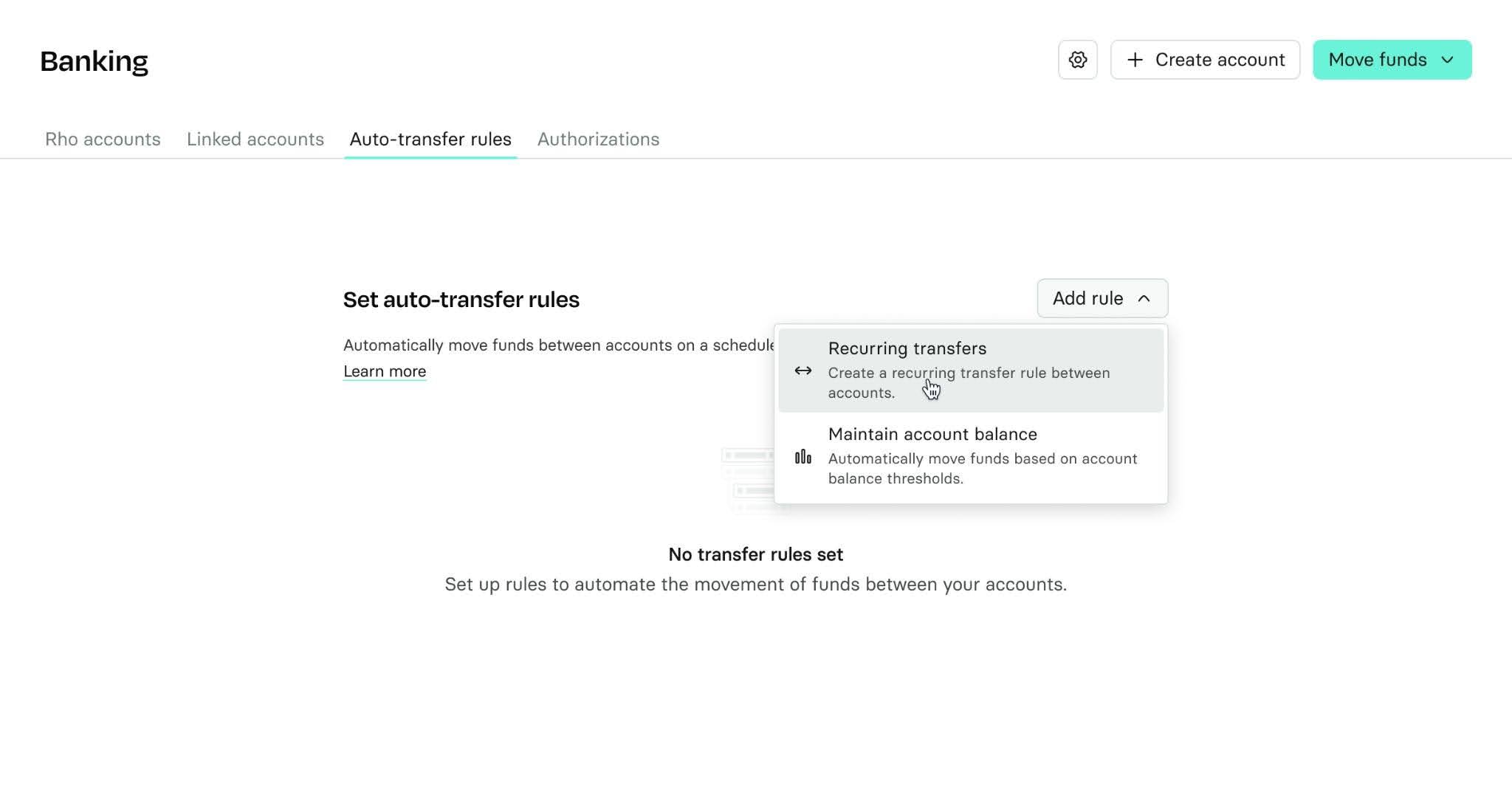
Go to All Accounts > Auto-transfer rules > Add rule.
Choose a rule type.
Select your source and destination accounts.
Configure the amount or balance threshold, then choose whether the rule runs on a Schedule or on Balance change
Click Create rule.
Your rule becomes active immediately.
 After a rule is created, the source and destination accounts can't be changed. To use different accounts, delete the rule and create a new one. You can edit the amount and cadence at any time.
How auto-transfer rules work
Treasury rules don't run on weekends or market holidays. If a scheduled run falls on one of those days, it runs on the previous applicable business day unless otherwise noted.
Recurring transfers
Recurring transfers settle on the date you select. That date is the settlement date, not the date the transfer is initiated: Rho initiates the transfer early enough for funds to settle when you need them.
Recurring transfers are evaluated at 8:00 a.m. ET.
Maintain balance rules
Maintain balance rules run in one of two modes, which you choose when creating or editing the rule.
Schedule: Rho evaluates your balance at 8:00 a.m. ET on business days. If your balance falls outside the threshold, Rho schedules a transfer to settle on your configured arrival date. As with recurring transfers, the date you select is the settlement date, not the initiation date.
Balance change: Rho checks your balance after every settled transaction. When your threshold is crossed, a transfer starts that business day. There is no date to select. Transfers from Treasury still take up to three business days to settle.
How transfer dates work
Transfer direction | Date you select | How it works |
Checking → Checking | Settlement date | Transfer settles on the selected date. |
Treasury → Checking | Settlement date | Rho initiates the transfer 3 business days before settlement and adjusts earlier for weekends and market holidays. |
The date you select is the settlement date. Rho initiates the transfer in advance so your funds arrive on that date.
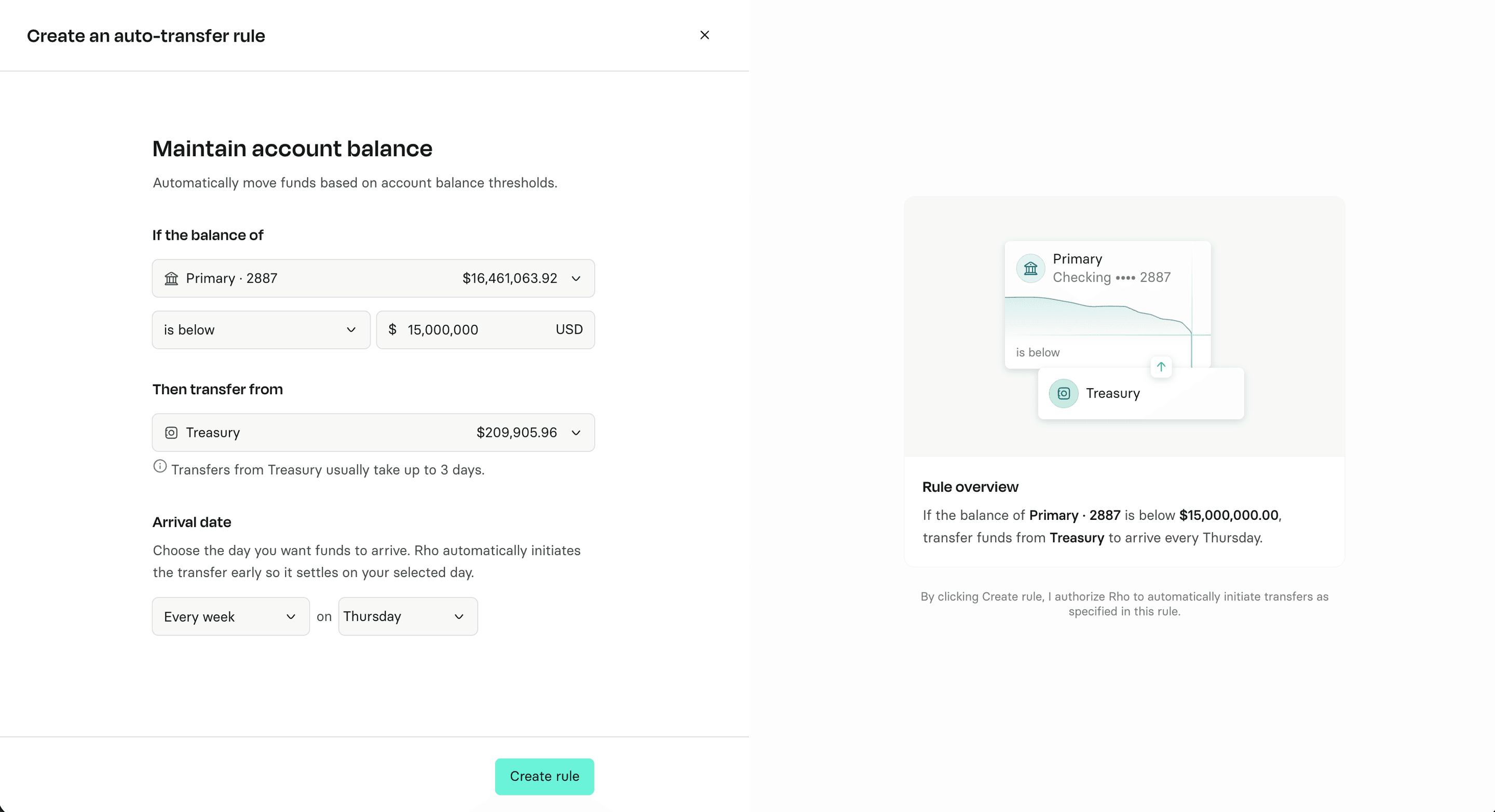
Maintain a minimum balance in Checking by transferring from Treasury
This is the most common rule for customers using Treasury. It helps keep your Checking account funded for payroll, vendor payments, and day-to-day operations.
On a schedule
Treasury liquidations can take up to three business days to settle, so this rule uses preset cadences with configurable dates. Select the cadence and dates that best fit your payroll and operating schedule.
Cadence | Settlement date | Common use case |
Weekly | Choose one day per week (Monday - Friday) for funds to settle | Weekly operations |
Twice monthly | Preset to 11th and 25th settlement | Bi-monthly payroll |
Monthly | Choose one date per month | Monthly payroll |
When applicable, Rho checks your Checking balance at 8 a.m. ET on business days. If your balance falls below your minimum, Rho initiates a Treasury liquidation so the funds settle on your next scheduled date.
Why these cadences?
Treasury → Checking transfers can take up to 3 business days to settle. These cadences are designed to help ensure funds are available in Checking when you need them, while keeping more of your excess cash working in Treasury. For additional flexibility between settlement dates, we recommend keeping about 3 months of operating cash in Checking.
 On balance change
Choose balance monitoring if you'd rather not wait for a scheduled date. See the section below.
Using balance monitoring
Balance monitoring shortens the wait between transfers. Instead of checking once a day and settling funds on a date you pick, Rho checks your balance after every transaction and initiates a transfer once your threshold is crossed.
Balance monitoring is available for all maintain balance rules — minimum, maximum, and $0 — across Treasury → Checking and Checking ↔ Checking.
What triggers a transfer
Rule | Trigger |
Minimum balance | Your balance falls below your minimum |
Maximum balance | Your balance rises above your maximum |
$0 balance | Any funds arrive in the account |
How much moves
Rho transfers only what's needed to bring your account back to your threshold, and accounts for any transfer already on its way. If a transfer is already in progress, Rho subtracts it before calculating the next one, so we’re never over-transferring while funds are settling.
Timing
Treasury → Checking – one transfer per business day. If your balance crosses the threshold again the same day, Rho waits until the next business day to initiate a transfer. Transfers triggered outside market hours, on weekends, or on market holidays initiate next business day. Funds take up to three business days to settle.
Checking ↔ Checking – transfers start immediately each time your threshold is crossed, with no daily limit. Funds settle the same day.
What balance monitoring does and doesn't change
Balance monitoring changes when a transfer starts, not how long it takes to arrive. A Treasury → Checking transfer still takes up to three business days to settle.
If your balance drops the day before payroll, balance monitoring starts the transfer immediately, but the funds may not arrive in time. For obligations you can't miss, keep your minimum high enough to cover them.
Switching between modes
You can switch an existing rule between Schedule and Balance change at any time. The change takes effect immediately, and any transfer already in progress completes as planned.
Rule limits
You can have up to 5 active auto-transfer rules per organization.
Each source and destination account pair can have only one rule.
Rules that would create a circular flow of funds are blocked. For example, you can't create both a Operating → Payroll minimum balance rule and a Payroll → Operating maximum balance rule between the same accounts.
Common scenarios
My Treasury account doesn't have enough funds
The transfer won't be completed, and you'll receive a notification.
The rule ran, but no transfer happened
Your account already met the balance requirement when the rule was evaluated, so no transfer was needed.
My execution date falls on a weekend or market holiday
The transfer runs on the prior business day.
My balance dropped twice in one day
For Treasury → Checking rules using balance monitoring, Rho transfers once per business day. The second drop is recorded and evaluated again the next business day. Checking ↔ Checking rules have no daily limit.
My balance dropped after hours or over the weekend
Rho evaluates your balance right away and initiates the Treasury withdrawal on the next business day, when markets reopen. Checking ↔ Checking transfers aren't affected and run as usual.
A transfer failed or was rejected
Rho removes it from the pending total and re-evaluates your balance right away, so a replacement transfer can start.
Existing rule migration
If your Treasury rule was on a weekly Thursday schedule, it has been moved to balance monitoring. Rho now checks your Checking balance after every transaction and initiates a transfer when it falls below your minimum, rather than waiting for Thursday.
Before: If your Checking balance falls below $250,000, Rho initiates a Treasury sale in advance so funds settle in your Checking account every Thursday.
Now: Whenever your Checking balance falls below $250,000, Rho initiates a Treasury sale for the amount needed to restore your minimum – up to once per business day.
Your minimum balance and account settings remain the same. You can review your rule at any time from the Auto-transfer rules page, or switch back to a fixed schedule if you'd prefer funds to arrive on set dates.
Frequently asked questions
Is balance monitoring available for all rule types?
Yes. Balance monitoring works with minimum, maximum, and $0 balance rules, for both Treasury → Checking and Checking ↔ Checking.
Will balance monitoring get my funds there faster?
It starts the transfer sooner, but settlement time is unchanged. Treasury → Checking still takes up to three business days; Checking ↔ Checking settles same-day.
Are the preset Treasury schedules only for customers who were migrated from sweep rules?
No. The preset schedules apply to all Treasury → Checking maintain minimum balance rules using Schedule mode. Custom schedules are available for Checking ↔ Checking transfers.
Why is weekly the most frequent scheduled option for Treasury → Checking rules?
Treasury → Checking transfers can take up to three business days to settle. These cadences help ensure funds are available when you need them, while keeping more of your excess cash working in Treasury. If you want funds to move more often than weekly, use balance monitoring instead.
Can I create rules in both directions between the same two accounts? Can I use the same source account for two rules?
No. Each account pair supports only one rule in one direction, and each account can only be the source of one rule.
For example, if you have an Operating → Payroll rule and a Treasury → Operating rule:
You can't also create a Payroll → Operating rule for that same account pair
You can't create another rule with Treasury as the source (such as Treasury → Payroll), since Treasury is already a source elsewhere
Can one Treasury account fund multiple Checking accounts?
No, only one Checking account can be funded by Treasury.
What happened to the top-up amount from the previous sweep feature?
Auto-transfer rules now transfer only the amount needed to restore your account to its minimum balance. To maintain additional cash in your Checking account, set a higher minimum balance threshold or recurring transfer amount.
Need help?
If you have questions about setting up or managing auto-transfer rules, contact Rho Client Service at clientservice@rho.co or call 855-743-8746.