
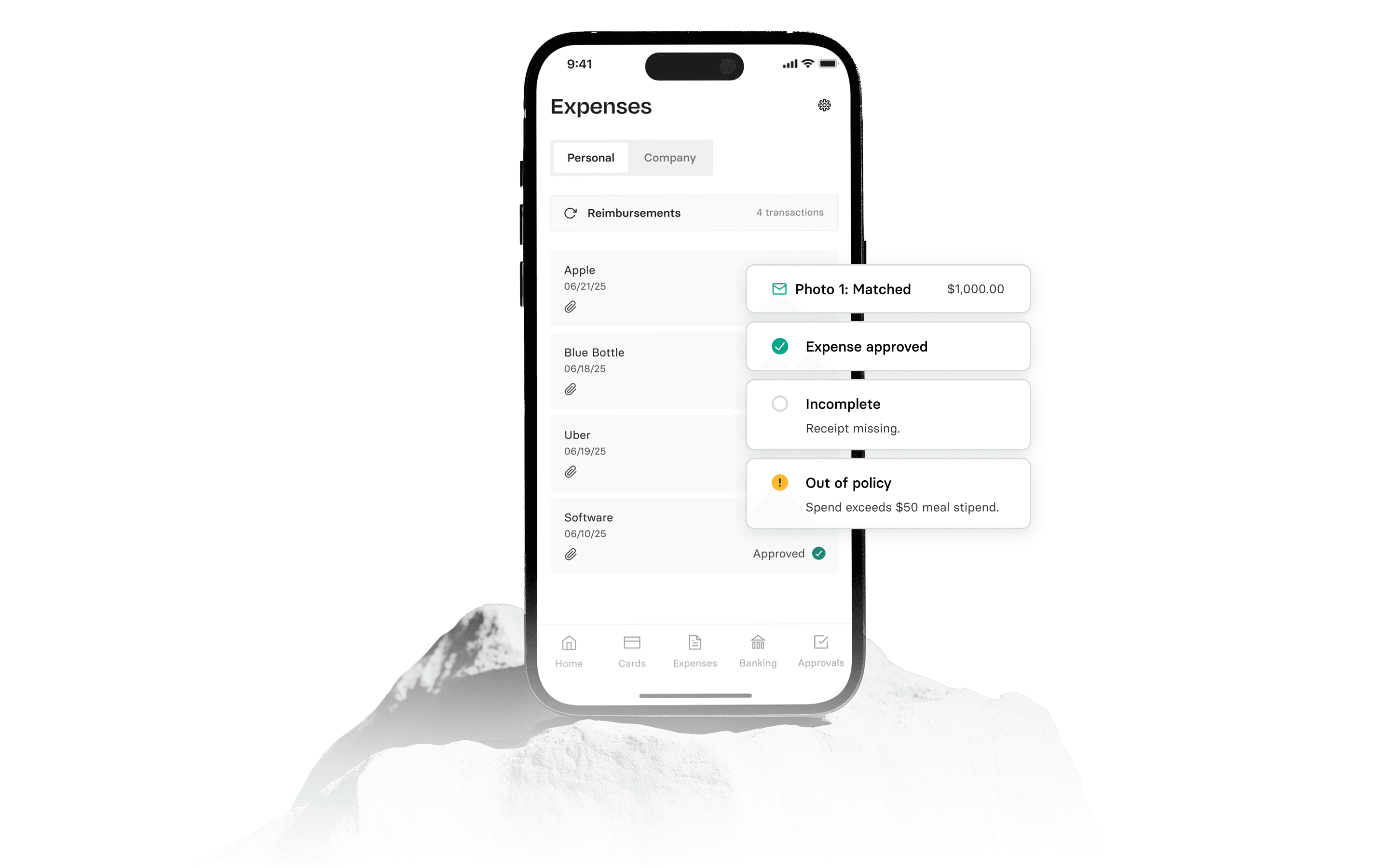

Corporate cards with mobile controls allow you to manage your company’s spending directly from an app. This gives you real-time oversight and security over how, where, and when cards are used.
This guide covers the key factors to consider when choosing a corporate card with mobile controls, including what controls you should have for corporate card use. We will evaluate options based on fees, spend controls, issuance speed, rewards, and integrations, and explain how our platform addresses each aspect and how you can get started.
What are mobile controls for corporate cards?
Mobile controls for corporate cards are divided into two main functions: viewing and editing. Understanding this distinction is crucial when deciding what controls you should have for corporate card use.
View controls provide a transparent, real-time window into all card activity. This allows you to review current card controls, such as permitted spending categories, merchant-specific rules, and international spending status.
Edit controls give you the power to actively manage those settings. A corporate card with spend management controls lets you make immediate changes, like toggling international use, setting custom card usage dates, or instantly locking a card if it's lost or stolen.
These features are fundamental for knowing how to control spending with corporate card limits and enforcing your expense policy without slowing down your team.
Key features of corporate cards with view and edit controls in the mobile app
When evaluating platforms, following best practices for corporate card use controls means looking for a specific set of features that offer both detailed oversight and quick adjustments.
- Real-time visibility into all transactions and card settings
- The ability to instantly create a card, whether virtual or physical
- Options to lock, unlock, or cancel a card directly from the app
- Granular controls to restrict spending by merchant or category
- Customizable alerts for card activity via push notification, email, or SMS
- Tools to assign custom attributes to transactions for easier accounting, which can help control corporate card limits by department.
Get view and edit controls in the Rho Mobile App
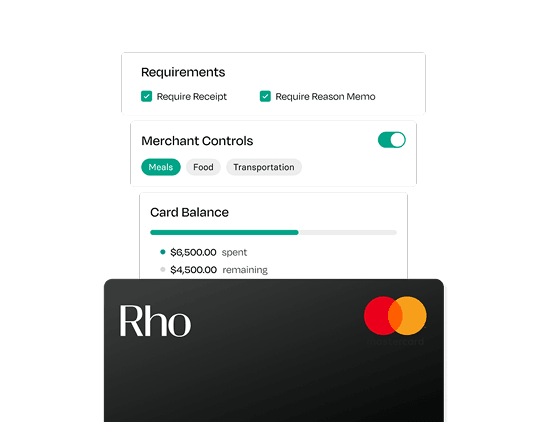
The Rho Mobile App gives you the command center you need for your corporate cards. It’s designed to provide the detailed view and edit controls that help you manage company spending with confidence and precision.
Here is what that includes:
- Merchant and category controls: You can limit card use to specific vendors or entire spending categories. This is more granular than standard cards, which often only allow broad restrictions.
- Custom usage dates: Set start and end dates for card activity, which is ideal for project-based spending or temporary employee access.
- Automated transaction mapping: Assign custom attributes to transactions directly in the app. This simplifies how you can control corporate card limits by department and makes bookkeeping faster.
- International spend toggle: Instantly enable or disable international transactions with a single tap, adding a layer of security against foreign fraud.
Beyond card controls, the app also supports your team with integrated expense management tools. Employees can upload receipts on the go, and admins can deposit checks or approve payments, all from one place.
Tips to choose the right mobile-supported corporate cards
Choosing the right corporate card with mobile support is about finding a balance between flexibility for your team and robust control for your finance function.
When evaluating your options, here are a few tips on how to find the best corporate cards with view and edit controls in a mobile app:
- Assess the depth of control. Go beyond simple on/off switches and look for granular rules for specific merchants, spending categories, and custom usage dates.
- Seek integrated expense management. The best platforms connect card controls directly to expense reporting, allowing your team to capture receipts and code transactions in the same app.
- Verify full card lifecycle management. Ensure you can create, monitor, lock, and cancel cards instantly from your phone to respond to needs in real time.
- Consider the unified financial platform. A mobile app that also handles check deposits, payment approvals, and bank balances offers a more complete solution.
- Confirm security and support. Prioritize providers with FDIC-insured partner banks and accessible support channels, like the direct contact options available in our app.
How to control corporate cards via the Rho Mobile App
Getting started with the Rho Mobile App is straightforward, giving you direct access to manage your company’s finances from anywhere. It puts powerful view and edit controls right at your fingertips.
Here’s how to set up and use the app’s controls:
- First, download the Rho app from the App Store or Google Play and sign in to your account.
- Navigate to the 'Cards' tab and select a card to view its details, then tap 'Card Settings' to see and adjust its specific controls.
- From here, you can set merchant-specific or category controls, toggle international spending, and define custom usage dates for each card.
- You can also create new cards, lock or unlock existing ones for security, and request new spending limits directly within the app.
FAQs about corporate cards with mobile controls
What are the eligibility requirements for a Rho corporate card?
Our platform is designed for U.S.-based businesses, from early-stage startups to established companies. We work with a variety of incorporated clients, though we do not currently support sole proprietorships or unincorporated businesses.
Are there any fees for using Rho corporate cards or the mobile app?
We believe in transparent pricing. Our corporate cards come with no annual fees, transaction fees, or late fees, and the Rho mobile app is free to download and use.
How do approval workflows function within the Rho mobile app?
You can set up multi-level approval workflows based on teams or dollar amounts, ensuring the right person reviews each expense. Approvers can then review and action pending payments and transfers directly from the Rho app, keeping your operations moving without delay.
Can I manage both physical and virtual cards from the app?
Yes, the Rho app gives you full control over both virtual and physical cards. You can create new cards, view details, lock or unlock them, and manage all their settings right from your mobile device.
How does the app help with expense reporting beyond just card transactions?
The app is a complete expense management tool. Employees can submit out-of-pocket expenses, request reimbursements for things like mileage, and upload receipts for any transaction, not just those made with a Rho card.
What kind of support is available if I need help with the mobile app?
We provide dedicated support directly through the app, as well as via phone, email, and SMS. You can find all our contact options easily, ensuring you get help whenever you need it.
Get started with Rho Mobile App today
Take command of your company's spending and automate your financial operations from anywhere. This gives you the freedom to focus on what's most important: growing your business and preparing for your next round.
Sign up here today.