

Every month, founders and their accountants end up coding the same transactions all over again.
Today we're launching Rho Close to change that - a feature in Rho that learns how your business codes its transactions and, when you're ready to close, generates a suggested first pass so you're not starting from zero.
Highlights
When you open Rho Close, it looks at your chart of accounts, your vendor history, and your prior coding decisions to suggest how to categorize each transaction.
Suggestions are calibrated to how your business actually codes, not a generic model, and they get more accurate every month.
You review, accept, override, or dismiss each suggestion, and nothing syncs to your accounting system until you approve it.
Why close never quite gets solved
Every month looks the same. The accounting view opens and there's a blank list of transactions waiting - the same vendors, the same categories, the same decisions you made last month and the month before.
You know what they are. You just have to go do it again.
That's true whether you're a founder doing your own books or an accountant managing close for a dozen startup clients. The first pass is the same repetitive work either way.
Rho Close changes that.
How Rho Close works
Rho looks at your chart of accounts, your vendor history, and every coding decision you've made - and builds a picture of how accounting works for your business.
When your next close arrives, it surfaces a suggestion for every transaction. Not pulled from a generic dataset. Derived from yours.
When you're ready to close, open the accounting view and click to generate suggestions. Review what Rho found, accept what looks right, and override anything that doesn't.
Nothing hits your accounting system until you say so.
Every decision you make - accept, dismiss, or correct - feeds back into future suggestions. The longer you use Rho Close, the less time close takes.
How Rho Close helps busy founders
You're not optimizing your close. You're trying to not fall behind on it.
The problem isn't that coding transactions is complicated. It's that nothing remembers what you decided last month. So every close starts from zero, and every close gets pushed until the deadline forces it.
Rho Close fixes that. One click, a first pass, review what looks right, sync. Done. And faster every month.
But there's a second reason it matters at the early stage: investors doing diligence move fast, and the first time they open your financials they're forming an impression of how you run your company.
Clean books don't guarantee a successful raise. Messy ones can stop one.
Rho Close keeps you in control and helps you build the finance foundation a VP of Finance would be proud of, transaction by transaction, month by month.
Financial first impressions matter. Rho Close.
How Rho Close helps accountants move faster
If you're managing close for early-stage clients, you already know the first pass is the least valuable part of your time. You know what these transactions are. You've coded the same vendors the same way for months.
The work isn't complicated - it's just there, every month, before you can get to anything else.
Rho Close handles the first pass. One click generates a suggested categorization for every transaction, calibrated to how you've coded that client's books - not a generic model, your methodology.
You review, correct the few that don't look right, and sync. The accountant stays in the loop. It just changes what they're doing while they're there.
The time that used to go to data entry now goes to the kind of work that actually requires your judgment.
The payroll increase that creates an R&D credit opportunity. The revenue growth that triggers a sales tax obligation in a new state. The pattern in the numbers that a founder wouldn't catch on their own.
That's the kind of advisor you want to be. Rho Close clears space for it.
How to connect Rho Close
Rho Close works through your accounting integration. Here's how to get set up:
Connect your accounting software. Click the Integrations icon in the left-hand navigation bar, then select your accounting software.
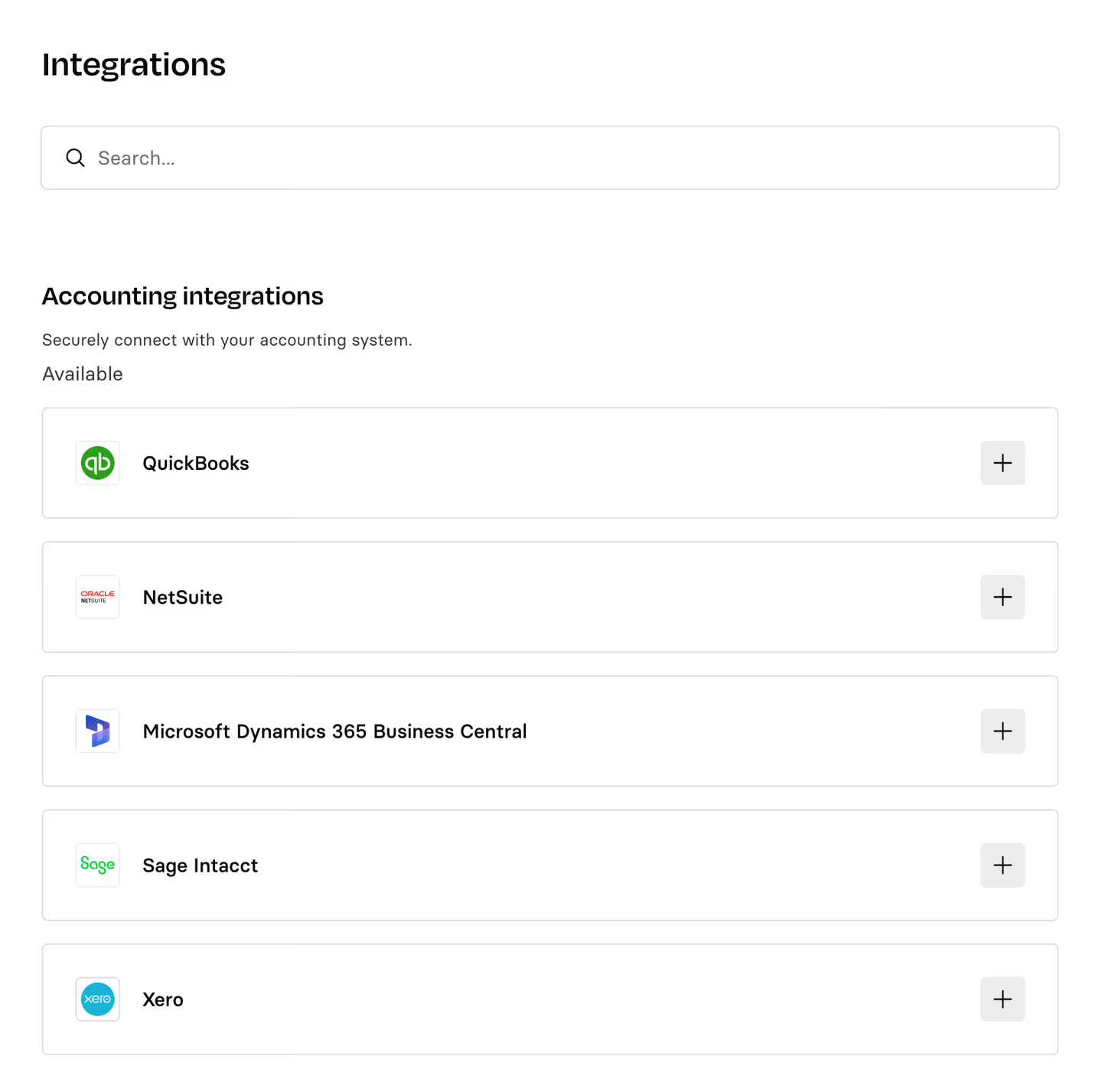 2. Enable Rho Close. Navigate to Accounting > Settings > General. Rho Close is toggled on by default.
 3. Generate suggestions From the accounting dashboard, click "Generate suggestions" above your transactions. Rho will surface suggested GL codes and categories for every uncoded transaction it has enough data to assess.
 4. Review and approve Accept a suggestion by clicking the green checkmark. Override anything that doesn't look right. Nothing syncs until you approve it.
 For full setup details, see the Rho Close help center article.
Get started
Rho Close is available now. If you're a Rho client, start using it here.
Not yet on Rho? Apply today.
Simple, powerful business banking.
Let Rho automate finance busywork so you can stay focused on serving your customers.
Rho is a fintech company, not a bank. Checking and card services provided by Webster Bank, a division of Santander Bank, N.A., member FDIC; savings account services provided by American Deposit Management Co. and its partner banks.
FAQs
Rho looks at your chart of accounts, your vendor history, and every coding decision you've made on Rho. It builds a suggested first pass based on how your business actually codes, not a generic model trained on someone else's books. The longer you use it, the more accurate it gets.
No. Nothing syncs until you review and approve it. You open the accounting view, click to generate suggestions, review what Rho found, and sync when you're ready. Every step requires your sign-off.
Rho Close works with the same accounting integrations as Rho's accounting experience: QuickBooks Online, Oracle NetSuite, and Sage Intacct via native direct integration. Xero is also supported via bank feed, with coding handled on the Xero side.
Yes. Rho Close requires a native accounting integration. If you're currently exporting CSVs, you'll need to connect a supported integration to take advantage of the feature.
Yes, always. Accept suggestions in bulk or one at a time. Override anything that doesn't look right. Rho learns from every correction, so the next close is more accurate than the last.
Most founders doing their own books are coding the same transactions month after month. Same vendors, same categories, same decisions repeated from scratch. Rho Close does that first pass for you. Open the accounting view, click to generate suggestions, review what's right, and sync. Close goes from a few hours to a few minutes, and gets faster every month.
If you're managing books for one startup or ten, the first pass is the part that eats your time. Rho Close does it for you. When you're ready to close, click to generate suggestions based on how you've coded before. Review what's right, correct what isn't, sync. Your methodology stays intact. Your time doesn't disappear into data entry.
Every time you accept or override a suggestion, Rho learns from that decision. Over time the suggestions match your coding patterns more closely, which means less to review and correct each month. You don't have to do anything differently for this to happen.
Anyone with access to the accounting view on Rho. That includes the founder, a first finance hire, or an outsourced accountant managing the books on your behalf. Permissions follow your existing Rho account settings.