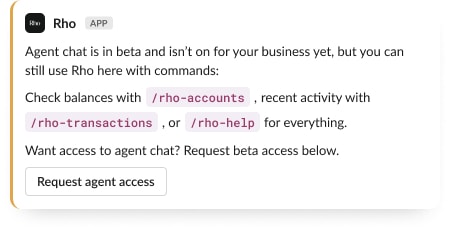
Commands
Type /rho in any Slack message field:
Command | What it does |
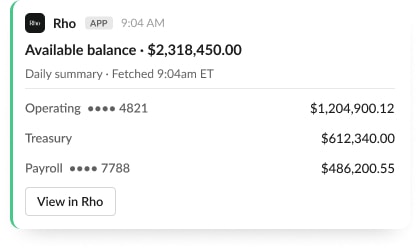
/rho-accounts | Your balances across accounts |
/rho-transactions | Recent transactions, with a link to see everything in Rho |
/rho-help | Everything the app can do, tailored to your setup |
/rho-feedback | Send the Rho team a bug report, request, or note |
/rho signin, /rho-signout | Manage your personal sign-in |
Command replies are visible only to you, even in a channel, so nothing personal lands in shared rooms.
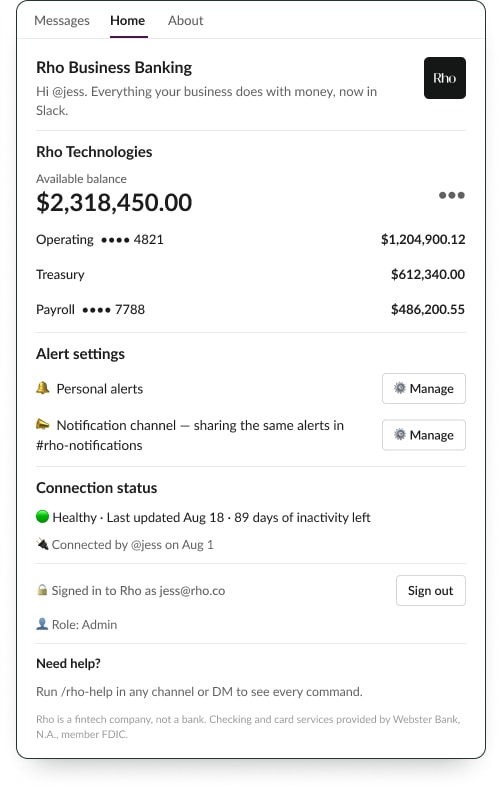
The Home tab
Open the Rho app from your Slack sidebar for the dashboard view: available balance, your accounts, alert settings, connection status, and your signed-in identity. The balance menu includes Refresh and Open in Rho.
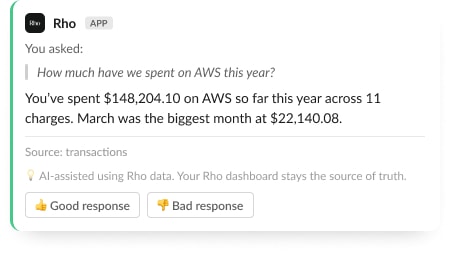
(Beta) Ask questions in plain language
Agent chat is in beta for select Rho businesses. When it is on for yours, ask questions three ways:
DM the Rho app directly
Mention @Rho in a private channel
Type your question after /rho, like /rho how much did we spend on travel in July
The agent answers using your live Rho data: balances, transactions, statements, and spend by vendor, category, or person. Every answer names its sources and includes a reminder that your Rho dashboard stays the source of truth. It is read-only, so it can look things up but never move money.
A few useful mechanics:
Questions asked in a channel are answered by DM, so your business data stays out of shared rooms
Statement download links work for about 15 minutes; just ask again if one expires
If you ask before signing in, sign in within 15 minutes and the app answers your original question automatically
If agent chat is not on for your business yet, commands still work, and you can request beta access right from the app.